
Picking a template is the first decision you make when you open an AI resume generator, and it quietly shapes everything that follows. The template controls which of your qualifications a recruiter sees first, how easily software can read your file, and whether your career story lands as “clear progression” or “confusing gaps.” Before you obsess over fonts and colors, you need to choose a format — chronological, functional, or hybrid — because that structural choice matters far more than the design. This guide breaks down the three template families every serious AI resume generator offers, shows you when each one wins, and explains how to let the tool do the heavy lifting.
Format vs. design: what a resume template actually controls
The word “template” gets used two ways, and mixing them up costs job seekers interviews. Design is the visual layer: font, spacing, color accents, whether there’s a sidebar. Format is the underlying structure: the order and prominence of your sections. You can wrap the same format in a dozen designs, but you can’t fix a poorly chosen format with a prettier font.
Every reputable AI resume generator organizes its library around three format archetypes. Understanding them is the difference between a template that markets your strengths and one that accidentally buries them.
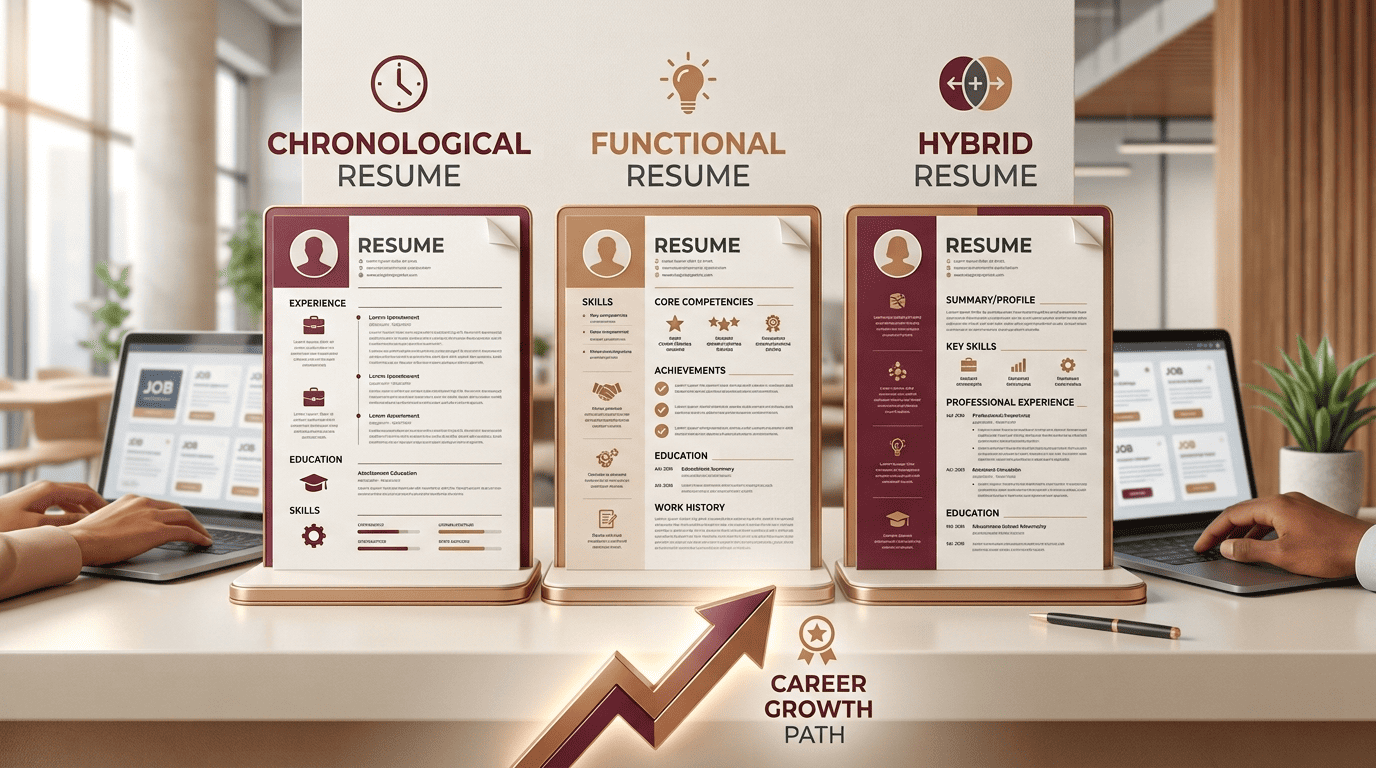
The three resume templates every AI resume generator offers
Chronological (reverse-chronological) templates
The reverse-chronological template lists your work history from most recent job backward, with dates, titles, and accomplishments front and center. It is, per Wikipedia’s overview of résumé formats, “the current preferred standard,” and it’s what most recruiters expect to see the moment they open your file.
It shines when your recent experience is directly relevant and your timeline is steady. Given that the median U.S. employee tenure was 3.9 years in January 2024 according to the Bureau of Labor Statistics, most professionals have a natural sequence of roles this format can showcase. The trade-off: because it foregrounds dates, it also spotlights employment gaps and short stints.
Pick chronological if: you’re advancing within your field, your recent roles are your strongest selling point, and you want the fastest, clearest read.

Functional (skills-based) templates
The functional template flips the priorities. It opens with grouped skill categories and accomplishments, then keeps the work-history section brief. As Indeed’s career-advice guide puts it, the goal “is to prove to your reader that you are capable of carrying out the duties required by the job you are applying for” — regardless of where those skills were earned.
That makes it attractive for career changers, people re-entering the workforce, or first-time applicants with limited history. The catch is that many employers are wary of it. Indeed notes that some recruiters “may see functional resumes as disorganized or incomplete,” and its popularity has declined precisely because a skills-only layout can look like it’s hiding something.
Pick functional if: your transferable skills matter more than your timeline, and you understand you’re trading recruiter familiarity for emphasis.
Hybrid (combination) templates
The hybrid — also called the combination format — is the middle ground and, for many candidates, the smartest default. It opens with a summary and a compact skills or “core competencies” block, then still lists a full reverse-chronological work history below. You get to control the first impression with your strongest skills while keeping the transparent timeline recruiters trust.
It’s the go-to for candidates with non-linear paths, mixed work types, or a recent gap they’d rather contextualize than hide. Because it retains real dates and titles, it avoids the credibility problem that dogs pure functional resumes.
Pick hybrid if: you need to highlight specific skills up top but don’t want to sacrifice the clean chronology that hiring software and humans both prefer.
Which resume template should you choose?
Use this quick decision path:
- Steady career, same field, strong recent roles → chronological.
- Career change, employment gap, or a first job with thin history → hybrid first; consider functional only if you have a specific reason.
- Applying to a large company or through an online portal → chronological or hybrid, always. (More on why below.)
- Freelance, portfolio, or highly skills-driven role → hybrid, leading with a competencies block.
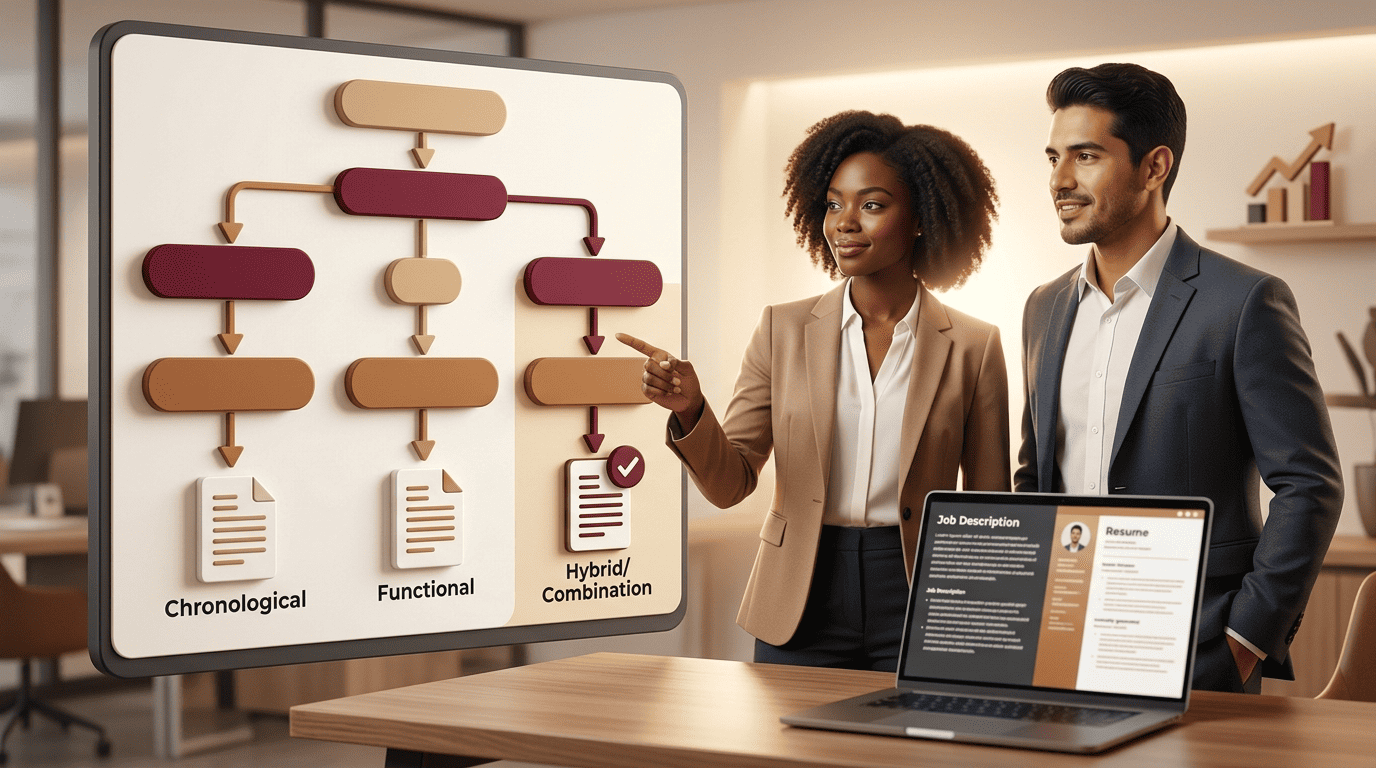
Notice that functional almost never comes out on top. That’s not an accident — it reflects both recruiter psychology and the software gate nearly every application now passes through. If you’re navigating a pivot specifically, our deep dive on using an AI resume generator for a career change walks through how to frame transferable skills without triggering red flags.
Why templates and the ATS gate go hand in hand
Before a human reads your resume, an Applicant Tracking System usually reads it first. In 2025, an ATS was detected for 97.8% of Fortune 500 companies, per Jobscan’s annual usage report. These systems parse your file into fields — name, titles, dates, skills — and any format that scrambles that parsing works against you.
This is where template choice becomes strategic, not cosmetic. The landmark Harvard Business School and Accenture “Hidden Workers” study found that 88% of employers agreed that qualified, high-skills candidates are vetted out of the process because they do not match the exact criteria established by the job description. As the report states, capable applicants are “filtered out” long before a recruiter sees them — often because their history doesn’t follow the linear path keyword-matching systems were built to read.
Functional templates are especially vulnerable here: by minimizing the dated, titled work-history that parsers rely on, they can produce garbled results. Chronological and hybrid layouts feed the ATS exactly what it expects — clear headings, standard section names, dates tied to titles, and role-specific keywords in context. That’s the practical reason the decision path above leans so hard away from pure functional.

A modern AI-powered resume generator sidesteps this trap by building on parser-safe structures: standard section labels, no text buried in images or complex tables, and keyword suggestions pulled from the job description you paste in.
How to build each template with an AI resume generator
The point of an AI tool is that you don’t hand-craft any of this. Here’s the workflow that turns a job posting into a tailored, correctly formatted resume in minutes:
- Paste the job description. The generator scans it for required skills, tools, and keywords, then flags which of your experiences match.
- Let it recommend a format. Good tools suggest chronological, functional, or hybrid based on your history and the role — you’re not guessing.
- Generate the draft. The AI slots your details into an ATS-safe structure and writes accomplishment-driven bullet points aimed at the posting.
- Choose a design. Only now do you pick fonts and colors — layered on top of the format, never replacing it.
- Tailor per application. Because generation takes seconds, you can produce a version tuned to each posting instead of sending one generic file everywhere.

If cost is a concern, you don’t need a paid tier to get started — see our rundown of the best free AI resume generator options and what each one includes.
A quick reminder: a template and a smart AI resume builder tool make you presentable and readable, not automatically hired. They tilt the odds by getting you past the software gate and into a recruiter’s hands with your strongest qualifications framed clearly. The interview is still yours to win.
FAQ
What is the best resume template format for most people?
For most job seekers, a reverse-chronological or hybrid template is the safest choice. Both are recruiter-familiar and parse cleanly through Applicant Tracking Systems, which nearly every large employer uses. Reserve the functional format for narrow situations where a skills-first story genuinely outweighs a clear timeline.
Are AI resume generator templates ATS-friendly?
Reputable AI resume generators build their templates on parser-safe structures — standard section headings, no text trapped in images or graphics, and keywords drawn from the job description. Chronological and hybrid outputs tend to be the most ATS-friendly. Complex, design-heavy templates with sidebars or tables can still confuse some systems, so favor clean layouts.
What’s the difference between a resume template and a resume format?
Format is the underlying structure — which sections appear and in what order (chronological, functional, or hybrid). Template usually refers to the visual design layered on top: fonts, colors, and spacing. You choose a format first because it decides what a recruiter sees first; the design is secondary.
Can I switch templates after I’ve generated my resume?
Yes. One advantage of an AI resume generator is that your content is stored as structured data, so you can regenerate the same information in a different format or design without retyping anything. This makes it easy to test a hybrid version against a chronological one for a specific role.
Should a career changer use a functional resume template?
Not usually. A functional template can look like it’s hiding an unstable history, and it often parses poorly in ATS software. Career changers are typically better served by a hybrid template that leads with a transferable-skills summary while still keeping a transparent, dated work history below it.
How many resume templates should I keep on hand?
You really only need one strong base — a hybrid or chronological structure — and then tailor it per application. Because AI generation is fast, the better habit is regenerating a targeted version for each posting rather than maintaining a stack of static templates.